
How the timeline works
Why one life event appears on several pages, and what the timeline shows in what order.
One event, seen from every person in it#
When Monica and Chandler married, their friends were there. In Monica, the wedding is one life event, with Monica, Chandler and each guest listed under Who was there. It is not copied onto each page: every person’s timeline reads the same event.
This is deliberate. We think that recording a fact once should fill in both the day it happened and the records of the people involved, and that you should never have to enter the same thing twice. So:
- You add the wedding once, from any of the pages of the people in it.
- A change you make from Chandler’s page shows on Rachel’s page too.
- Deleting it from one page takes it off every page.
The entry says who else was there. With Monica, Ross, Rachel lists the other people. Each name leads to that person’s page, except for a partial contact, who has no place in your list of people.
Where the timeline is#
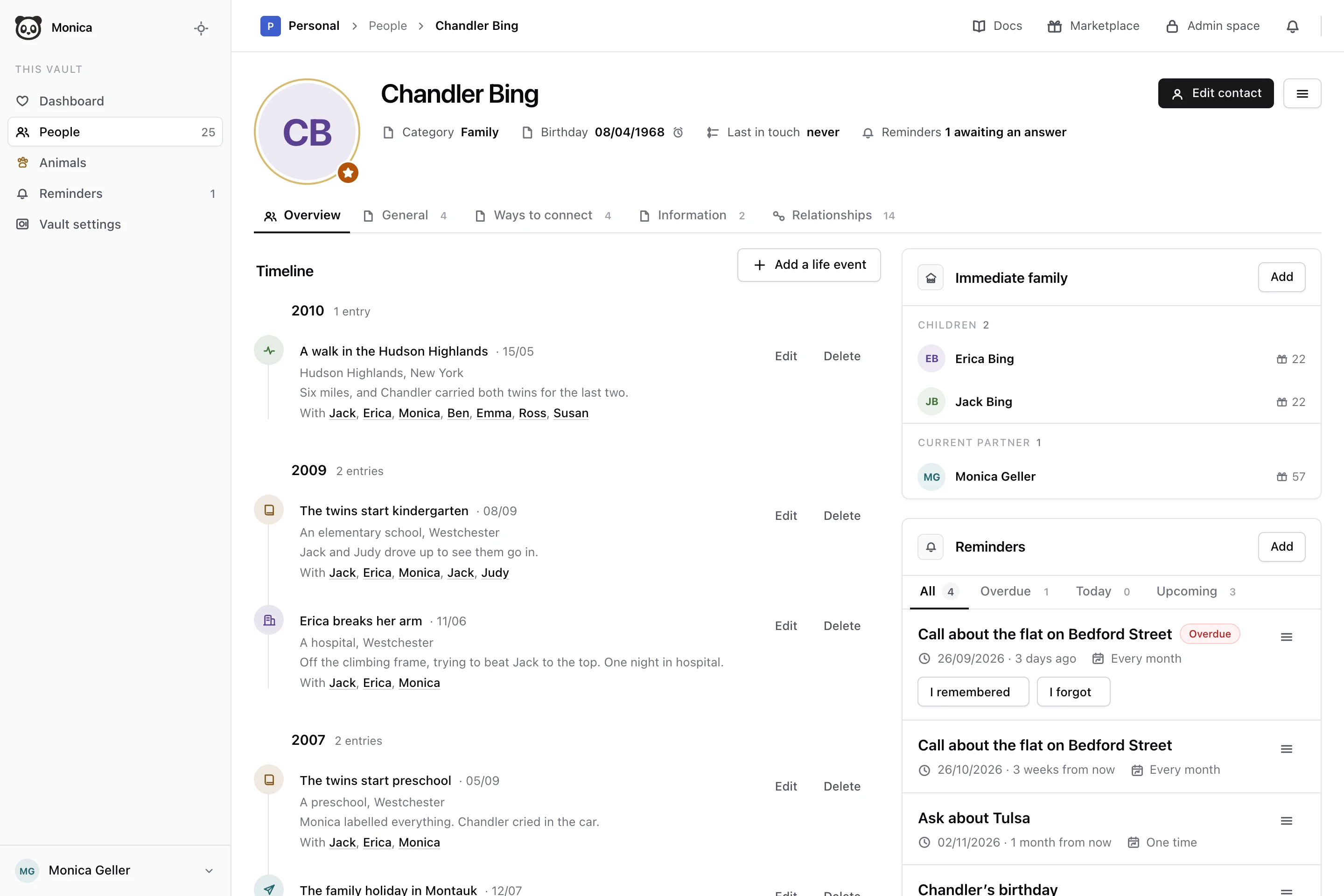
Each contact’s timeline is on the Overview tab of their page, under Timeline. It holds their life events, and nothing else: relationships, reminders and notes have their own places on the page.
The timeline of a whole vault#
The dashboard of a vault has a timeline of its own, under Timeline. It holds the life events of everybody in the vault, one period at a time.
On the left, a short list of periods: Upcoming first, for what is planned from today on, then every year that holds a life event, the most recent first. Each one says how many entries it holds. Choose a period to see only its life events, grouped by month. Upcoming events come nearest first, and the events of a year come most recent first. At the bottom, Newer and Older take you to the next period either way.
Above the list, two choices narrow it down. With anyone lets you type a name and keep only the life events that person took part in. All event types keeps only one type, such as a wedding. The counts beside each period follow these choices, so you can see at once which years hold something. Clear filters puts both back.
Each entry shows its title, its date and who was there. To read the rest, choose Details on the entry. A panel opens under it with everything you wrote down: the type and its category, the description, the time and how long it lasted, the place, the group it belongs to, every field of its type that you filled in, the files attached to it, and each person who was there with the part they played and how they are related to you. Monica reads these details only when you ask, so a vault holding hundreds of life events opens just as fast. Choose Hide details or Close to fold the panel away. For example, choose Details on Monica and Chandler’s wedding to read that it took place in a ballroom in Manhattan, that Joey officiated, and who else was there.
The dashboard only shows life events. To change or delete one, choose Edit on its entry: it opens the page of a person who took part.
What order it is in#
On a person’s page, the newest event comes first. Events are grouped by year, and each year says how many entries it holds. Within a year, the most recent date comes first.
The timeline shows a page of entries at a time. At the bottom, choose Load more to go further back.
What each entry shows#
An entry shows the type of event or its summary, its date, and the details you chose to fill in, such as the place, the description and the fields of its type. Each type has its own icon and colour at the start of the line, so a move and a wedding look different at a glance.
Two short labels help you find your own changes: Just added marks an event you have just recorded, and Edited one you have just changed.
Life events and relationships#
A relationship and a life event record different things. That Ross and Rachel are partners is a relationship. That they moved in together on a given day is a life event. Adding, changing or ending a relationship does not put anything on the timeline, so record the day itself as a life event if you want to remember it.